The problem
The book holds about 900 properties and buys from 285 vendors. The numbers that describe the business sit in the ERP, in company card transactions, in fuel records and in month-end spreadsheets. Each source has its own timing and its own gaps. A figure moving month over month can mean the business changed, or it can mean a source stopped arriving, and the figure by itself does not separate those two. I specified a reporting surface where every metric carries its formula, its source, the vintage of the data behind it and its caveats, so a reader can tell which case they are looking at before they act on it.
Earlier work
I built a daily operations brief for leadership covering vendor scorecards, price anomaly flags, AP exceptions and AR aging. The reporting platform develops that work into pages a reader can investigate.
My role
I defined the operating problem, specified the system, directed the build and reviewed the result. AI agents wrote most of the code under my review gates.
I specified the page subjects and metric definitions, including source dates, missing-data behavior and the thresholds a reader uses to investigate exceptions.
What was built
Fifteen pages in the September 7 deployment check. Sixteen layouts exist; fifteen are served and one is generated to a file only. By subject:
- Overview, the headline figures with their vintages.
- Money: revenue, margin, sold-work costs, receivables, card spending and a four-week ticket-revenue outlook, with the page’s stated limits.
- Sales: pipeline, and contract survival by the year a contract started.
- Operations: recorded field work and schedule history, time and payroll readiness, the four-week expectation, projected crew hours, and weeks that fall outside control limits.
- Customers: the book of business and reachability gaps.
- Fuel: current-period consumption and cost, fuel-type comparisons, reconciliation and truck economy. A combined metrics table and an explanation of variance accompany the outlook for the next three months.
- Fuel by route.
- Items and vendors: spend and exposure, catalog quality and vendor quality.
- Data hygiene: 35 checks.
- Spend and credit: the payment rails, top vendors over trailing twelve months, card transactions by month, a spend integrity check shown check by check, and possible duplicate payments shown pair by pair.
- Forecasting: four series four weeks out, a model bench, how past projections actually scored, and season and trend per metric.
- Paper invoices: bills and line items by month, who bills us most, the paper price beside the operator-entered price for diesel and regular, and every ingest verdict.
- ERP audit: this week by domain, and findings run by run.
- Estimating history: frozen, ending June 2026, aggregates only.
- Data health: instruments, the watchdog strip, nightly card-pull completeness, and retrieval index gates.
One metric registry, in code. Every metric carries a formula, the source it reads, an owner, a granularity, the vintage of the data behind it, its caveats, a privacy flag, and, where one is set, a threshold with the authority who ruled it. Metrics marked private are withheld from published output.
Navigation built for answering a question. A “Find a business figure” search with a state filter runs over every metric that is not withheld, and each result links to that metric where it lives on its page. A “What needs a look” list orders exceptions ruled against a threshold first and figures that could not be computed second; metrics that were never graded are never judged. A metric with no value prints the words “no data” and the reason in the space the number would have occupied, so a blank never reads as a zero.
Evidence attached to every figure. A definition disclosure on each tile, an exact-value table beside every chart including projection ranges and missing points, and a methods disclosure at the page level. Printing expands the evidence and the definitions, then restores the reader’s state on screen.
The source record describes the wider components as follows. These rows are dated implementation records, not a new check of every running job:
| Part | State |
|---|---|
| Fifteen served pages and the metric registry | Shipped |
| Data hygiene, 35 ruled read-only checks | Deployed nightly |
| Weekly audit run, 104 to 108 checks, report-only | Deployed |
| Naming standard, 40 rules with drift checks | Deployed; ratifying a fix regenerates the fix list and applies nothing on its own |
| Cross-rail spend cube and monthly sweeps | Running; its specification is still a draft |
| Daily card bills and transaction pull | Deployed |
| Renewals view | Prototype; a read-only query with no timer |
| Estimating history | Frozen at June 2026 |
How it works
A reader starts with a headline figure, opens its definition and checks the source date before following the supporting records. A spend question can lead through card charges, purchase orders, invoices and reconciliation exceptions. A duplicate-payment flag is a reason to investigate, not proof of the cause of an increase.
Coverage and data-health information qualify what the reader can conclude. Missing inputs produce a stated reason rather than a plausible zero. The monthly fuel workbook carries definitions with the exported values.
Figures and their status
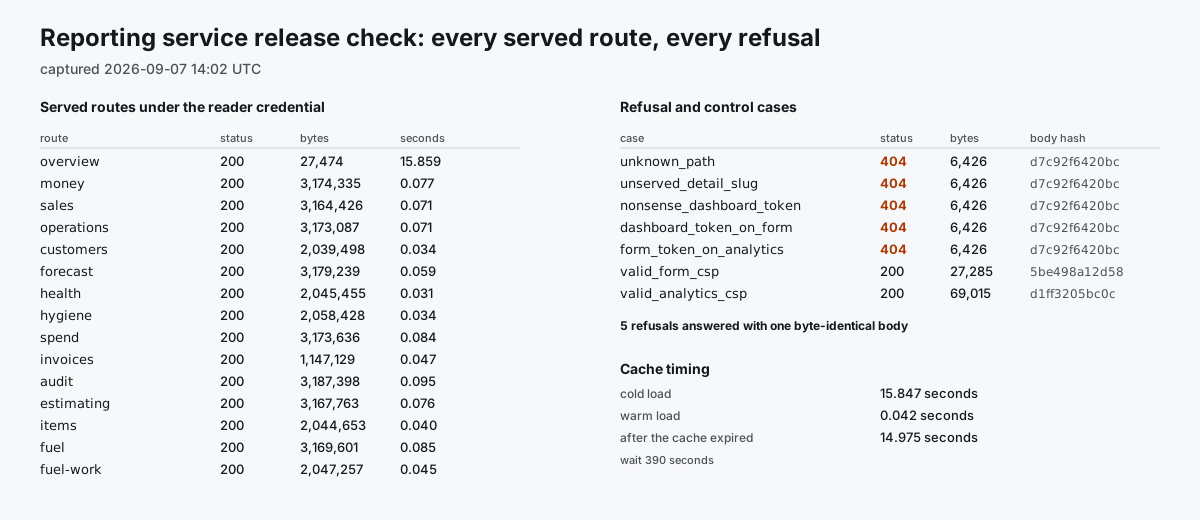
Figure unavailable.
Evidence
| Evidence | Dated account |
|---|---|
| Deployed | All fifteen served pages answered successfully. |
| Used | A design record describes a daily reading; nobody counted it. |
| Measured | No reader, session or page-view count. |
| Claim | Date | What was checked |
|---|---|---|
| Deployed | 2026-09-07 | All fifteen served pages answered successfully under the reader credential at the release check, and the checked unauthorized-access cases were refused. |
| Used | Stated, undated | A design record states that this is my daily reading. That is a statement in a document, not a measurement. The monthly workbook publishes into a private repository. |
| Measured | None | There is no view instrumentation. No count of readers, sessions or page views exists. |
Every claim on this page is my own account of my own work.
Observed results
Outcome not yet measured. No before-state was recorded, so there is no baseline to compare against, and the platform does not count its own use.
What I would measure, given a baseline and instrumentation:
- Time from a question being asked to an answer somebody will act on.
- Share of month-end figures that get revised after they are published.
- Share of flagged exceptions that turn out to be real when someone checks them.
None of those are running today.
What this does not show
- Aggregates only. Per-person figures stay behind the access credential and are published nowhere, this page included.
- The estimating history page is a frozen snapshot ending June 2026. It cannot support current weekly forecasts, so those projections refuse in words and print no number at all.
- The source record measured about fifteen seconds for a cold load and about four hundredths of a second for a warm load, with a five-minute cache. These are historical timings, not a current benchmark.
- A synthetic walkthrough can demonstrate the interface. It does not record a real operational investigation.
- Nothing here has third-party corroboration. None of it has been independently audited.
Relevant next action
If this resembles your problem, the first engagement on the consulting page is the workflow review: a paid review of the reporting you already run, and of where its figures disagree with each other.
Related work: ERP data checks, which is the hygiene page above as its own entry, and the account coverage and territory map, built for the same company off the same ERP mirror.
Walkthrough
Synthetic demonstration with fictional data. Stock synthetic narration.
If playback is unavailable, read or download the transcript below.
Read the full transcript
Synthetic demonstration with fictional data. Stock synthetic narration. Start with the overall picture: money, sales, operations and data quality. This demonstration uses fictional figures. The revenue outlook is one hundred and twenty thousand dollars. That outlook combines sixty thousand dollars of weighted open pipeline with sixty thousand remaining on a won contract. Open the definition to see what the figure includes and when it was measured. The two components are counted once. Sales shows one hundred and forty thousand dollars of open pipeline before probability weighting. This gives the manager a starting point for a sales review. Operations highlights six unscheduled tickets. The next step is to review the schedule and the work behind that count. Forecasting shows why a projection is unavailable: there are only three observations. The page keeps that reason visible. A recorded zero for undeposited payments means a value was supplied. It is different from a missing observation. Filter for unavailable figures to find the questions the data cannot yet answer. The measured zero stays out of that list.
Full tour
Synthetic demonstration with fictional data. Stock synthetic narration.
If playback is unavailable, read or download the transcript below.
Read the full transcript
Synthetic demonstration with fictional data. Stock synthetic narration. Start with the overall picture: money, sales, operations and data quality. This demonstration uses fictional figures. The revenue outlook is one hundred and twenty thousand dollars. That outlook combines sixty thousand dollars of weighted open pipeline with sixty thousand remaining on a won contract. Open the definition to see what the figure includes and when it was measured. The two components are counted once. Sales shows one hundred and forty thousand dollars of open pipeline before probability weighting. This gives the manager a starting point for a sales review. Operations highlights six unscheduled tickets. The next step is to review the schedule and the work behind that count. Forecasting shows why a projection is unavailable: there are only three observations. The page keeps that reason visible. A recorded zero for undeposited payments means a value was supplied. It is different from a missing observation. Filter for unavailable figures to find the questions the data cannot yet answer. The measured zero stays out of that list. Spend brings card and bill totals into view. Vendor comparisons show where spending is concentrated. Inspect the chart and its exact-value table together. The vendor amounts are shown in dollars. Invoices brings bill counts and line-item history together. Use the price comparison to review changes across purchases. Customers surfaces the property book and gaps in contact coverage. A manager can review where more complete account information is needed. Fuel tracks gallons and cost by fuel type. Here, four hundred gallons amounts to fourteen hundred dollars. The fuel chart and exact values keep the breakdown visible, so the manager can inspect the mix of fuel used. Follow the four hundred gallons into route allocation. The two routes add back up to the fuel total. Estimating brings win rates and service price comparisons into the review. Actuals coverage helps determine how much margin evidence is available. Open the estimating chart to compare the series, then use the table for precise values and units. Items combines material spend with catalog quality checks. Source dates stay visible so older records can be recognized. Data hygiene groups findings by check. A recorded zero remains visible alongside checks with findings. The audit view shows findings across reporting periods. This fictional nine, eight, six sequence demonstrates how that history can be inspected. Data health puts source freshness in the review. It gives the manager a place to see which sources need attention. The source coverage separates a June snapshot from a September rollup. Check the observation date before treating a figure as current. This tour covered fifteen reporting subjects. For another business, the first step is to agree on the decisions, connect the relevant systems, and define the numbers.